Clean Interface
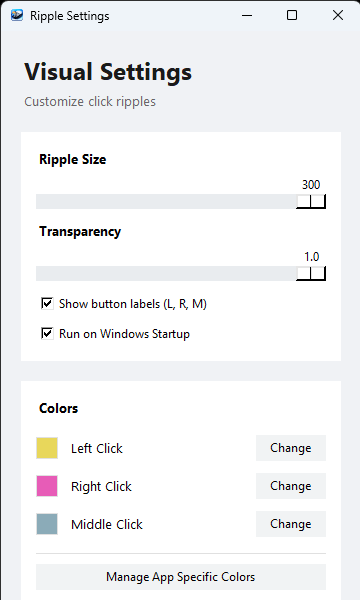
A lightweight, elegant utility that adds beautiful visual ripples to your mouse interactions. Perfect for presentations, screen recordings, and gaming.
Download for WindowsVersion 1.0.0 | MIT License
Adjust ripple size, transparency, and animation speed to match your personal style.
Set unique colors for different applications. Automatically switch profiles based on your active window.
Distinct colors for Left , Right , and Middle clicks.
Built with efficiency in mind. Runs silently in the system tray without affecting PC performance.
Get up and running with Ripple Mouse Effect in seconds.
Click the download button above to get the latest Mouse Pointer.exe file.
Launch the executable. No installation is required as the software is fully portable.
Find the icon in your system tray to adjust colors, size, and application rules.
Watch this quick guide to see how to customize your mouse effects and set up app-specific rules.